
Every MERN developer has experienced it.
A project starts with a few components, a couple of API routes, and a handful of utility files. Everything feels clean. Then features begin to grow. Authentication arrives, dashboards are added, file uploads become necessary, notifications appear, and suddenly the project contains hundreds of files scattered across random folders.
The biggest problem is rarely the code itself. It's usually the structure.
A scalable folder structure is not about making your repository look beautiful. It is about making development predictable. New developers should know exactly where to place a file. Future you should not spend ten minutes searching for a validation schema. Code reviews become faster, testing becomes easier, and refactoring becomes far less painful.
In this guide, we'll build a production-ready MERN architecture that has worked well for medium and large applications. The examples use React, Express, MongoDB, and TypeScript, but the overall principles apply to JavaScript projects as well.
Why folder structure matters more than people think
Small projects survive almost any organization. Large projects don't.
Consider two teams building the same SaaS application. Both write equally good code. After six months, one repository still feels manageable while the other becomes frustrating to navigate.
The difference is usually consistency.
A good folder structure gives you:
- Faster onboarding for new developers
- Predictable file locations
- Better separation of concerns
- Easier testing
- Cleaner imports
- Simpler feature expansion
- Reduced merge conflicts
Think of your project like a city. Roads matter just as much as buildings. If every street is random, reaching any destination becomes difficult regardless of how impressive the buildings are.
The real-world problem
Let's imagine you're building a project management platform similar to ClickUp.
Initially, your backend looks like this:
server/
├── auth.js
├── user.js
├── task.js
├── db.js
├── middleware.js
├── upload.js
├── utils.js
├── routes.js
└── app.js
The frontend isn't much better:
src/
├── Dashboard.jsx
├── Sidebar.jsx
├── Task.jsx
├── TaskModal.jsx
├── Button.jsx
├── api.js
├── helper.js
└── styles.css
Everything is fine until you reach fifty components and thirty API endpoints.
Questions begin appearing:
- Where should validation live?
- Should services call Mongo directly?
- Where do reusable hooks belong?
- Is authentication a feature or a shared module?
- Why are API functions mixed with UI components?
These questions are signs that the architecture has outgrown its initial structure.
The core philosophy
Before creating folders, define responsibilities.
A scalable MERN project usually has four clear layers:
- Presentation: React components and pages
- Business logic: Services and application logic
- Data layer: Mongo models and repositories
- Infrastructure: Config, middleware, utilities, storage
Each layer should know as little as possible about the others.
Instead of organizing by file type only, organize primarily by feature, while keeping shared resources centralized.
The production architecture
Here's the structure we'll build.

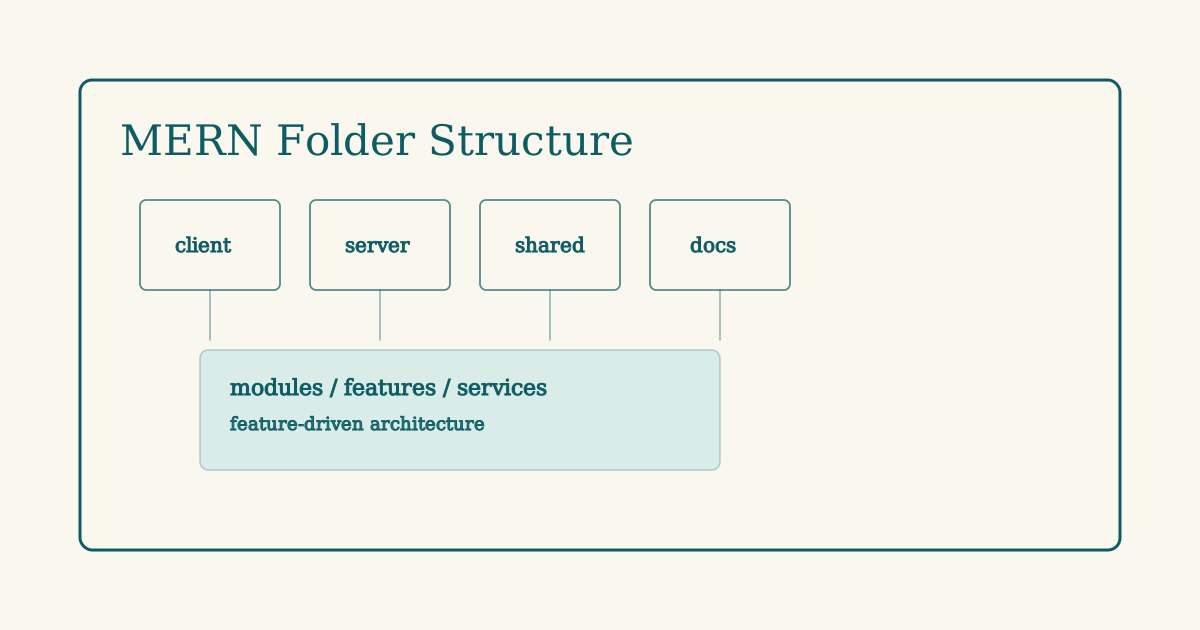
mern-project/
│
├── client/
├── server/
├── shared/
├── docs/
├── .env.example
├── docker-compose.yml
├── package.json
└── README.md
Each directory has a distinct responsibility.
- client contains the React application.
- server contains the Express API.
- shared stores reusable types and constants.
- docs contains architecture and API documentation.
This separation becomes extremely valuable when frontend and backend evolve independently.
Backend folder structure
The backend is where architecture usually becomes messy first.
A scalable Express structure looks like this:
server/
├── src/
│   ├── config/
│   ├── modules/
│   ├── middleware/
│   ├── services/
│   ├── repositories/
│   ├── utils/
│   ├── types/
│   ├── app.ts
│   └── server.ts
│
├── tests/
├── uploads/
└── tsconfig.json
Notice that there isn't a giant routes folder.
Instead, features live inside modules.
Feature-based modules
Each feature owns everything it needs.
modules/
│
├── auth/
│   ├── auth.controller.ts
│   ├── auth.routes.ts
│   ├── auth.service.ts
│   ├── auth.validation.ts
│   └── auth.types.ts
│
├── users/
│   ├── user.controller.ts
│   ├── user.routes.ts
│   ├── user.service.ts
│   ├── user.model.ts
│   └── user.validation.ts
│
└── tasks/
    ├── task.controller.ts
    ├── task.routes.ts
    ├── task.service.ts
    ├── task.model.ts
    └── task.validation.ts
This approach keeps related files together. When working on tasks, every relevant file is in one place.
Entry point
Keep server.ts minimal.
import app from "./app";

const PORT = process.env.PORT || 5000;

app.listen(PORT, () => {
  console.log(`Server running on ${PORT}`);
});
All configuration belongs inside app.ts.
import express from "express";
import cors from "cors";
import helmet from "helmet";

import authRoutes from "./modules/auth/auth.routes";
import taskRoutes from "./modules/tasks/task.routes";

const app = express();

app.use(cors());
app.use(helmet());
app.use(express.json());

app.use("/api/auth", authRoutes);
app.use("/api/tasks", taskRoutes);

export default app;
The server starts the application. The app configures middleware and routes. Keeping them separate improves testing.
Models belong to features
Avoid one massive models folder.
import { Schema, model } from "mongoose";

const taskSchema = new Schema(
  {
    title: {
      type: String,
      required: true,
      trim: true,
    },
    status: {
      type: String,
      default: "todo",
    },
    priority: {
      type: String,
      default: "medium",
    },
  },
  {
    timestamps: true,
  }
);

export const Task = model("Task", taskSchema);
The model stays close to its controller and service, making the feature self-contained.
Service layer
Controllers should stay thin.
Bad controller:
router.post("/", async (req, res) => {
  const task = await Task.create(req.body);
  res.json(task);
});
Better approach:
export class TaskService {
  async create(payload: CreateTaskDto) {
    return Task.create(payload);
  }

  async getAll() {
    return Task.find().sort({ createdAt: -1 });
  }
}
Controller:
const service = new TaskService();

export const createTask = async (req, res) => {
  const task = await service.create(req.body);
  res.status(201).json(task);
};
The controller handles HTTP. The service handles business logic.
Repository layer
For larger applications, add repositories between services and MongoDB.
export class TaskRepository {
  create(data: CreateTaskDto) {
    return Task.create(data);
  }

  findById(id: string) {
    return Task.findById(id);
  }

  update(id: string, data: UpdateTaskDto) {
    return Task.findByIdAndUpdate(id, data, {
      new: true,
    });
  }
}
Why bother?
If MongoDB changes, or caching is introduced, services remain untouched.
Frontend folder structure
A scalable React application should also be feature-driven.

client/
│
├── src/
│   ├── app/
│   ├── features/
│   ├── components/
│   ├── hooks/
│   ├── services/
│   ├── layouts/
│   ├── routes/
│   ├── types/
│   ├── utils/
│   └── main.tsx
The key distinction is:
- features contain business functionality.
- components contain reusable UI.
Feature organization
features/
│
├── auth/
│   ├── pages/
│   ├── components/
│   ├── api.ts
│   ├── hooks.ts
│   └── types.ts
│
├── tasks/
│   ├── pages/
│   ├── components/
│   ├── api.ts
│   ├── hooks.ts
│   └── types.ts
│
└── dashboard/
Everything related to tasks lives together.
Example API:
import axios from "@/services/api";

export const getTasks = async () => {
  const { data } = await axios.get("/tasks");
  return data;
};
React Query hook:
import { useQuery } from "@tanstack/react-query";
import { getTasks } from "./api";

export const useTasks = () =>
  useQuery({
    queryKey: ["tasks"],
    queryFn: getTasks,
  });
Now components stay extremely clean.
const TaskList = () => {
  const { data } = useTasks();

  return (
    <div>
      {data?.map((task) => (
        <TaskCard key={task._id} task={task} />
      ))}
    </div>
  );
};
Shared UI components
Reusable UI belongs outside features.
components/
│
├── ui/
│   ├── Button.tsx
│   ├── Input.tsx
│   ├── Modal.tsx
│   └── Spinner.tsx
│
├── DataTable/
└── EmptyState/
A button should not know anything about tasks.
Good:
<Button variant="primary">Create Task</Button>Bad:
<TaskButton />Keep business logic inside features.
Absolute imports
Relative imports become painful quickly.
Instead of:
import Button from "../../../components/ui/Button";Use aliases.
tsconfig.json
{
  "compilerOptions": {
    "baseUrl": "src",
    "paths": {
      "@/*": ["*"]
    }
  }
}
Now imports become:
import Button from "@/components/ui/Button";
import { useTasks } from "@/features/tasks/hooks";
This small improvement significantly increases readability.
Environment configuration
Never scatter environment access throughout the project.
Structure:
config/
├── env.ts
├── database.ts
└── logger.ts
Example:
import dotenv from "dotenv";

dotenv.config();

export const env = {
  PORT: process.env.PORT || "5000",
  MONGO_URI: process.env.MONGO_URI!,
  JWT_SECRET: process.env.JWT_SECRET!,
};
Everywhere else:
import { env } from "@/config/env";No direct process.env calls outside config.
Validation belongs with the feature
Using Zod is a clean approach.
import { z } from "zod";

export const createTaskSchema = z.object({
  title: z.string().min(3),
  priority: z.enum(["low", "medium", "high"]),
});
Middleware:
export const validate =
  (schema: AnyZodObject) => (req, res, next) => {
    req.body = schema.parse(req.body);
    next();
  };
Route:
router.post(
  "/",
  validate(createTaskSchema),
  createTask
);
Validation stays beside the task feature instead of hiding inside a generic folder.
File uploads at scale
Many MERN applications eventually need uploads.
A practical structure is:
uploads/
│
├── 2026/
│   ├── 08/
│   │   ├── 27/
│   │   │   ├── avatar/
│   │   │   └── tasks/
If using S3, mirror the same pattern:
boards/
2026/
08/
27/
tasks/
TASK-102/
uuid.pdf
Benefits include:
- predictable storage
- easier cleanup
- date-based lifecycle rules
- better scalability
Avoid dumping every file into one directory.
Shared types between frontend and backend
One underrated improvement is creating a shared package.
shared/
│
├── types/
│   ├── task.ts
│   └── user.ts
│
└── constants/
Example:
export interface Task {
  _id: string;
  title: string;
  status: "todo" | "doing" | "done";
}
Both client and server import the same interface.
This reduces duplicated type definitions and prevents API drift.
Testing structure
Tests should mirror features.
tests/
│
├── auth/
├── users/
├── tasks/
└── setup.ts
Example:
describe("Create Task", () => {
  it("creates a task successfully", async () => {
    const response = await request(app)
      .post("/api/tasks")
      .send({
        title: "Write blog",
      });

    expect(response.status).toBe(201);
  });
});
Mirroring the production structure makes test discovery intuitive.
How the architecture evolves
Projects usually grow through predictable stages.
Stage 1: MVP
client/
server/
Keep it simple.
Stage 2: Product
features/
services/
middleware/
Introduce feature boundaries.
Stage 3: SaaS
modules/
repositories/
shared/
docs/
tests/
Separate business logic from infrastructure.
Avoid building enterprise architecture on day one, but design so the transition is smooth.
Common mistakes developers make
Giant utils folder
This is probably the most abused directory.
Bad:
utils/
├── helper.ts
├── helper2.ts
├── finalHelper.ts
├── misc.ts
Instead, organize by purpose.
utils/
├── dates.ts
├── strings.ts
├── numbers.ts
└── crypto.ts
Each file should solve one problem.
Components that contain API calls
Bad:
const Dashboard = () => {
  useEffect(() => {
    axios.get("/tasks");
  }, []);
};
Better:
const Dashboard = () => {
  const { data } = useTasks();
};
The component renders UI. Hooks fetch data.
Business logic inside controllers
Avoid this:
export const completeTask = async (req, res) => {
  const task = await Task.findById(req.params.id);

  if (!task) {
    return res.status(404).json({});
  }

  if (task.status === "done") {
    return res.status(400).json({});
  }

  task.status = "done";

  await task.save();

  res.json(task);
};
Move rules into services.
await taskService.complete(id);Controllers become easier to read and easier to test.
Mixing reusable and feature-specific components
Ask one question:
Can another feature use this component?
If yes:
components/ui/If no:
features/tasks/components/This rule keeps reusable libraries genuinely reusable.
Ignoring barrel exports
Instead of importing deep paths everywhere:
import Button from "@/components/ui/Button";
import Input from "@/components/ui/Input";
Create:
export { default as Button } from "./Button";
export { default as Input } from "./Input";
Now:
import { Button, Input } from "@/components/ui";Cleaner imports also reduce refactoring effort.
Scaling strategy for teams
Folder structure is not enough. Teams also need conventions.

Naming conventions
Use consistent names.
task.controller.ts
task.service.ts
task.routes.ts
task.model.ts
task.validation.ts
Avoid mixed styles like:
TaskController.ts
task-service.ts
controller.task.ts
Choose one convention and enforce it.
One feature, one owner
Large teams benefit when features are isolated.
Example:
features/
├── billing/
├── workspace/
├── notifications/
├── crm/
└── reports/
Each feature becomes almost a mini application.
Developers can work independently with fewer merge conflicts.
Keep shared code small
A common mistake is moving everything into shared.
Shared should contain only truly reusable code.
Good candidates:
- Button
- Modal
- Input
- Date utilities
- Type definitions
Not good candidates:
- TaskCard
- InvoiceTable
- WorkspaceSidebar
Those belong to their features.
Document architecture
Add a lightweight docs folder.
docs/
├── architecture.md
├── api.md
├── deployment.md
└── database.md
Even a two-page architecture document saves hours of onboarding.
Include diagrams, naming conventions, and module responsibilities.
A complete production example
Here's what a mature MERN repository might look like.
mern-saas/
│
├── client/
│   └── src/
│       ├── app/
│       ├── components/
│       ├── features/
│       │   ├── auth/
│       │   ├── tasks/
│       │   ├── workspace/
│       │   └── billing/
│       ├── hooks/
│       ├── layouts/
│       ├── routes/
│       ├── services/
│       ├── types/
│       └── utils/
│
├── server/
│   └── src/
│       ├── config/
│       ├── middleware/
│       ├── modules/
│       │   ├── auth/
│       │   ├── users/
│       │   ├── tasks/
│       │   └── notifications/
│       ├── repositories/
│       ├── services/
│       ├── types/
│       ├── utils/
│       ├── app.ts
│       └── server.ts
│
├── shared/
│   ├── constants/
│   └── types/
│
├── docs/
├── tests/
├── docker/
├── package.json
└── README.md
This structure comfortably supports dozens of features without becoming difficult to navigate.
Best practices checklist
Use this checklist before shipping a new feature.
- Keep files grouped by feature.
- Keep controllers thin.
- Put business rules inside services.
- Validate requests before controllers execute.
- Keep reusable UI separate from feature UI.
- Use absolute imports.
- Centralize environment configuration.
- Mirror production structure in tests.
- Share types across frontend and backend.
- Maintain consistent file naming.
Following these consistently is more valuable than chasing the perfect architecture.
Final takeaway
There is no universally perfect folder structure. Every product has different requirements, team sizes, and deployment strategies.
What does scale is consistency.
A feature-driven architecture gives developers predictable boundaries. Services isolate business logic. Shared components stay genuinely reusable. Configuration remains centralized. As the application grows from ten files to a thousand, the mental model stays the same.
If you're starting a new MERN project today, resist the temptation to throw everything into components, routes, and utils. Organize by responsibility from the beginning. Future refactoring becomes dramatically easier, and your teammates will thank you every time they open the repository.
The best folder structure is the one your entire team can understand in seconds.
Frequently Asked Questions
Should I organize by feature or by file type?
For production applications, organize primarily by feature. Keep each feature's controller, service, validation, and types together. Use shared folders only for genuinely reusable code.
Is a repository layer necessary in MERN?
Not always. Small projects can let services interact directly with Mongoose. As applications grow, repositories improve maintainability by separating database access from business logic.
Where should React Query hooks live?
Place them inside the feature they belong to.
Example:
features/tasks/hooks.tsThis keeps API logic close to the feature instead of creating a massive global hooks directory.
Where should reusable UI components go?
Reusable components belong in:
components/ui/Feature-specific components should stay inside their respective feature folders.
Should Mongo models live in a global models folder?
For feature-driven architecture, keeping models inside each module is usually the cleaner approach because every feature becomes self-contained.
How many folders are too many?
Don't create folders for the sake of architecture. Start simple, then introduce new layers only when the project genuinely needs them. Complexity should solve a problem, not create one.
Can this structure work with Next.js instead of React?
Yes. The same principles apply. Replace the React entry with Next.js routing, but keep features, services, shared types, and business boundaries organized in the same way.